
Search

Witschi QuartzMaster Pro

TS-QUARTZMASTER/PRO

?

EFFICENT & AUTOMATIC

test sequences

?

GRAPHICAL DISPLAY

for direct measurement mode

?

RATE DEVIATION

via quartz frequency (32 kHz)

About the Product

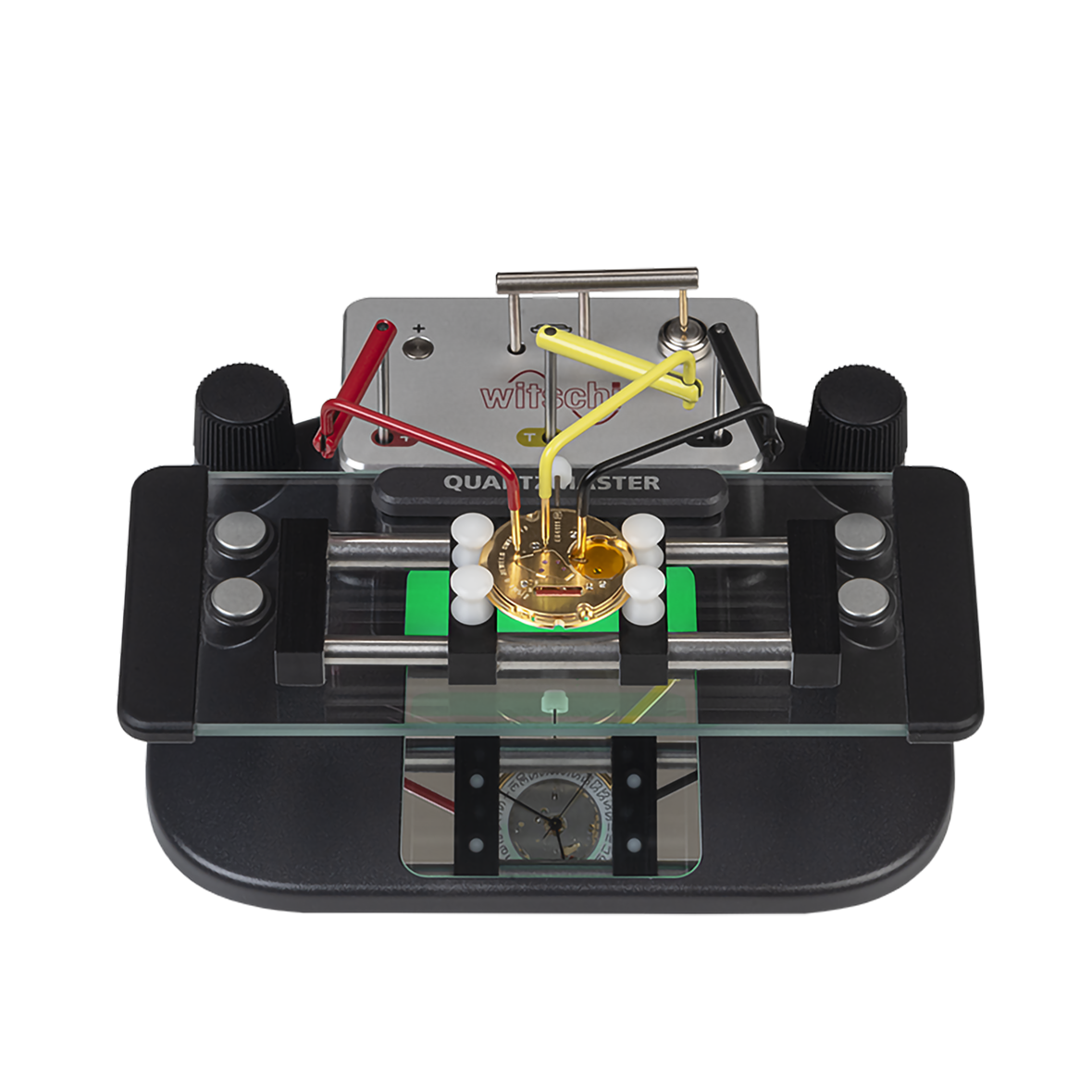
The QuartzMaster Pro offers an extensive range of measurement and testing options for the analysis of open quartz watches and the battery. Thanks to its quick, accurate measurement procedures, it is not only indispensable for service and production but also an important measuring instrument in the watch laboratory.

The expert in the measurement of open quartz watches – user-friendly and compact! With its freely configurable keys and rotary knobs, three practical contact brackets, and the ingenious watch movement holder, testing is trouble-free. Thanks to the optional dummy battery, the watch is quick and easy to connect to the measuring device. 

With Wicotrace test parameter and measurement results management, automated measurement programs can easily be created and managed centrally. The clearly laid-out application in Wicotrace supports an efficient test procedure.

All Witschi devices include a QR code that provides access to device registration, Witschi Apps, and the free version of Wicotrace 360°. Before installing Witschi Apps or Wicotrace 360°, please register your device and check for the latest firmware updates. For additional details, refer to the Witschi Apps and Wicotrace 360° Datasheets linked below.

Features

Features

  • Pulse generator
  • Direct measurement mode with graphical display
  • Easy to operate with configurable rotary knobs and keys on the device
  • Detailed graphic display of the motor pulses
  • Watch hands change color depending on the result and device status
  • Battery tester with load resistances of 100 Ω, 2 KΩ, and 2 MΩ
  • Mirror enables the user to see the hands from the working position
  • Automated measurement programs with Wicotrace
  • Suitable for both left- and right-handed users
  • Pulse generator
  • Direct measurement mode with graphical display
  • Easy to operate with configurable rotary knobs and keys on the device
  • Detailed graphic display of the motor pulses
  • Watch hands change color depending on the result and device status
  • Battery tester with load resistances of 100 Ω, 2 KΩ, and 2 MΩ
  • Mirror enables the user to see the hands from the working position
  • Automated measurement programs with Wicotrace
  • Suitable for both left- and right-handed users

Key Information

  • Requires Witschi Terminal, Windows tablet, or PC to operate. QuartzMaster will not operate on an Apple iPad.
  • PC screen requires minimum resolution of 1366 x 768 pixels.
  • Works with the following operating systems: Windows 10 & Windows 11 (64-bit) via a USB connection.

Specifications

Accelerated mode
Yes
Automatic determination of end of life voltage
Yes
Battery measurement
Yes
Beat rate range
-300 to +300 s/d (0.1% ± 0.03 s/d)
Bluetooth
No
Built in display
No
Coil resistance
Yes
Current measurement
Yes
Device style
Requires Terminal or Windows PC or Tablet
End-of-life voltage
Yes
Graphical display of motor pulses
Yes
Measurement method
Current with Variable Supply
Minimum operating voltage
Yes
Motor pulses measurement
Yes
Pulse generator
Yes
Quartz frequency measurement 32 khz
Yes
Rate deviation with and without inhibition step
Yes
Reference time
OCXO ± 0.026 s/d
Test positions
1
Watch type
Quartz
Weight
1.0 lb

Q&A

Every Witschi Terminal and microphone is available in both a Standard Version and a Pro Version.

The Standard Version provides the core timing functions:

  • Terminal: Diagram and Vario display modes, with support for up to two microphones simultaneously.
  • Microphone: Standard Watch Expert measurements, including Rate, Beat Error, Amplitude, and the trace line.

The Pro Version adds:

  • Sequence, Scope, and Trace display modes.
  • Support for up to four microphones simultaneously when using a Pro Terminal.

You only need one Pro device to access these advanced display modes. In most cases, a Pro Terminal is the most economical choice because it enables the additional features for every Standard microphone connected to it.

A Pro microphone is typically recommended only when the microphone will be connected directly to a computer without a Terminal, since there is no Terminal available to enable the Pro display modes.

It is recommended that you remove the movement from the case while testing. At a minimum, you must remove the caseback. To test a movement with the caseback, we recommend the Witschi QuartzSensor (stock # TS-QUARTZSENSOR).

Search